Powered by Blogger.

Knowledge Dojo

    • Home
    • JavaScript
    • _Concepts
    • Unity
    • C#
    • About
    • Contact
    Function Arguments

    In a Javascript method, there exists a variable named “arguments” that contains all the parameters passed in the function call. “arguments” is an array like object which contains parameters at indices and a property “length”. 

    function add()
    {
        var sum = 0;
        for( var i=0; i < arguments.length; i++ )
        {
            sum += arguments[i];
        }
        return sum;
    }
    
    add(1,2); // gives result 3 i.e. 1 + 2
    add(1, 2, 3, 4); // gives result 10 i.e. 1 + 2 + 3 + 4
    
    arguments is not a real array so you won’t be able to push or pop elements from it directly without converting it into real array.
    To convert arguments into array, use:
    var args = Array.prototype.slice.call(arguments, 0);


    Breaking a ForEach loop

    Consider you are given an array named arr of integers containing the following values:

    var arr = [ 1, 2, 3, 4, 5, 6, 7, 8, 9 ]; 

    If you are asked to iterate through the values in the loop, you may use the code like:

    arr.forEach( function(value){
     console.log('Current value: '  + value);
    });
    

    Javascript forEach loop demonstration

    If you are asked to break the loop as soon as you find the value 5. You will write a break statement just below the console.log statement. The code will look like this:

    arr.forEach( function(value){
     console.log(‘Current value: ‘ + value);
     if (value == 5)
      break;
    });
    

    But, the above code doesn’t work and gives the following error while executing.
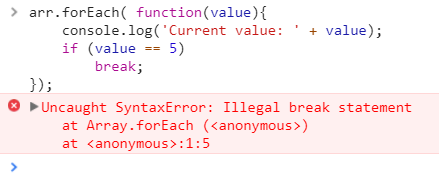

    Javascript forEach loop with break statement does not work

    The reason for this error is that forEach is a method and you cannot use break statement inside method. So. you cannot use break statement in forEach method.

    How to break then?
    Well, you cannot break a forEach in Javascript. 
    Instead you can use alternative to forEach method i.e. every method which returns a boolean for each value that determines whether the execution should be continues if the return value is true or to stop iterating if the return value is false.


    arr.every(function(element, index) {
     // Do your thing, then:
     if (element == 5) 
     {
      console.log("Breaking...");
      return false;
     }
       else 
     {
      console.log("Current Value: " + element);
      return true;
     }
    });
    

    Using every in javascript to break execution

    Parentheses position matters
    Consider these two javascript methods:
    function foo()
    {
     return
     {
      data:0
     }
    }
    function bar()
    {
     return {
      data:0
     }
    }
    Notice what happens when you call foo() and bar().
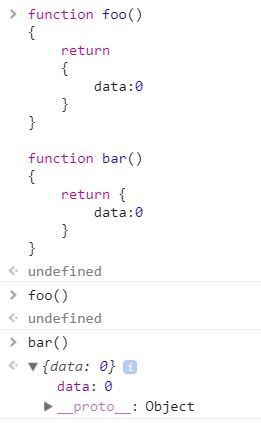
    parentheses position matters in javascript methods

    Calling foo() gives result undefined while calling bar() gives an object.
    You can try this in the browser's console window in the inspector.
    This is because, in Javascript, the position of parentheses matters.

    In method 
    foo(), the return statement is executed and it returns the control to the caller. Since there is nothing against return statement so it gives undefined.

    In method bar(), the return statement has a parenthesis starting against it so it processes the block until the closing parentheses and the object are returned to the caller.
    When it comes to writing code,
    an ounce of prevention is worth a pound of cure
    .
    A professional programmer spends only 20-30% of the time coding, rest 70-80% of the time is spent in scrolling the existing code up/down, or navigating to other code blocks to understand them. The later percentage can also increase too much if the code is a big mess. 
    But consider if the code quality is good enough that you do not need to navigate much understanding the code and also, the time for actual coding is the same, so the overall time reduces by a big difference of 20-40%.
    So the question, how to write a code that is clean and easy to understand?
    Here are some of the ways to write clean code:

    1. Remember, you are the one who would be responsible for your code
    Anyone can blame you for the code you write. In programming profession, sometimes there are cases when do not have ample time to complete the task, due to any reason, then you compromise on the code quality. This should not be done at all. A doctor will not say, I have to go home earlier so I will not be able to complete the full operation. So, remember, just to take the task with required dedicated time, or do not pick the task.


    2. Use meaningful names for variables, classes, and methods
    Avoid using names like temp, d, data, compute() etc. that does not denotes the intent of the code. Instead, use names that sound meaningful when pronounced.
    For example,
    "d" is a really bad variable name representing number of days
    use names like "elapsedTimeInDays"

    similarly, a method with name compute(int x, int y) does not denote how these values will be computed,

    instead use a method name like add(int x, int y) that denotes the clear intent of the code.


    3. Keeping the methods short that they fit on screen
    Keep the method line count so less that it should be visible on your screen without scrolling up or down. Ideally, a method should not be less than 50 lines of code, and if your code exceeds that benchmark, just split it into two or more methods.


    4. Do not use comments often
    Comments are a way to express the failure that you were not able to write code that explains itself what it does. Moreover, it also happens that a piece of code is changed but the comments are not changed. In such cases, comments lie about what code does. Try to write code that expresses itself what it does and how.


    5. Always follow the Boy-Scout rule
    The boy-scout rule says that leave the ground cleaner than you found it. Use the same practice in coding. Try refactoring some extra code(maybe just a few lines), but cleaner than before. Eventually, the code will keep clean day by day.


    6. Follow the Single Responsibility Principle
    Just because you can, doesn't mean you should.
    (Image source: Google)

    Instead of giving many responsibilities to a single method, divide them among methods such that each method does one thing, but it does that perfectly.

    Older
    ARTICLES

    IEnumerable vs ICollection vs IList vs IQueryable in C#

    Popular Posts

    • Audio latency on Unity 3d Android Platform
    • HTTP Interceptor in Angular 4

    Created with by BeautyTemplates

    Back to top