 Function Arguments
In a Javascript method, there exists a variable named “arguments” that contains all the parameters passed in the function call. “arguments” is an array like object which contains parameters at indices and a property “length”.
function add()
{
    var sum = 0;
    for( var i=0; i < arguments.length; i++ )
    {
        sum += arguments[i];
    }
    return sum;
}

add(1,2); // gives result 3 i.e. 1 + 2
add(1, 2, 3, 4); // gives result 10 i.e. 1 + 2 + 3 + 4
arguments is not a real array so you won’t be able to push or pop elements from it directly without converting it into real array.
To convert arguments into array, use:
var args = Array.prototype.slice.call(arguments, 0);Breaking a ForEach loop
Consider you are given an array named arr of integers containing the following values:
var arr = [ 1, 2, 3, 4, 5, 6, 7, 8, 9 ];
If you are asked to iterate through the values in the loop, you may use the code like:
arr.forEach( function(value){
 console.log('Current value: '  + value);
});

If you are asked to break the loop as soon as you find the value 5. You will write a break statement just below the console.log statement. The code will look like this:
arr.forEach( function(value){
 console.log(‘Current value: ‘ + value);
 if (value == 5)
  break;
});
But, the above code doesn’t work and gives the following error while executing.
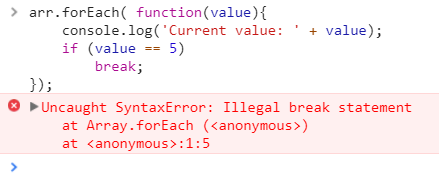
The reason for this error is that forEach is a method and you cannot use break statement inside method. So. you cannot use break statement in forEach method.
How to break then?
Well, you cannot break a forEach in Javascript.Instead you can use alternative to forEach method i.e. every method which returns a boolean for each value that determines whether the execution should be continues if the return value is true or to stop iterating if the return value is false.
arr.every(function(element, index) {
 // Do your thing, then:
 if (element == 5)
 {
  console.log("Breaking...");
  return false;
 }
   else
 {
  console.log("Current Value: " + element);
  return true;
 }
});

Parentheses position matters
Consider these two javascript methods:
function foo()
{
 return
 {
  data:0
 }
}
function bar()
{
return {
data:0
}
}
Notice what happens when you call foo() and bar().
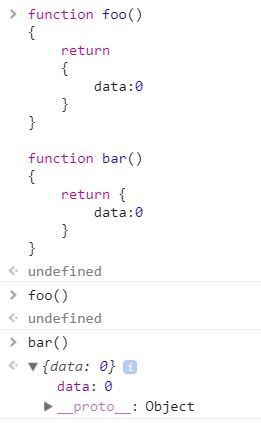
Calling foo() gives result undefined while calling bar() gives an object.
You can try this in the browser's console window in the inspector.
This is because, in Javascript, the position of parentheses matters.
In method foo(), the return statement is executed and it returns the control to the caller. Since there is nothing against return statement so it gives undefined.
In method bar(), the return statement has a parenthesis starting against it so it processes the block until the closing parentheses and the object are returned to the caller.
In method foo(), the return statement is executed and it returns the control to the caller. Since there is nothing against return statement so it gives undefined.
In method bar(), the return statement has a parenthesis starting against it so it processes the block until the closing parentheses and the object are returned to the caller.


